
If your company uses Lever as an Applicant Tracking System (ATS) and Framer to power its marketing website, you have almost certainly encountered the Careers Page Dilemma.
Recruiting teams want seamless job postings: whenever a role is opened, updated, or closed in Lever, the public careers page should reflect reality within seconds. Meanwhile, marketing and design teams want complete visual control: custom typography, silky scroll animations, responsive search bars, and dedicated, SEO-optimized job detail pages built on Framer CMS.
Until recently, the standard advice across the web (including prominent templates and agency guides) was to piece together makeshift solutions using raw HTML iframes, client-side Fetch components, or recurring third-party automation webhooks like Make.com or Zapier.
While those hacks sound viable in a brief blog tutorial, they quickly turn into high-maintenance liabilities in production. Let’s break down exactly what happens when you do it the hard way—and why a native in-editor plugin is a lifesaver.
The 3 Ways Teams Try Doing It Without a Native Plugin (And Where They Break)
Method 1: Raw HTML Embeds & Client-Side Fetch Components
The most basic workaround involves dropping a Framer custom code component into your page that runs a client-side JavaScript fetch() call to Lever’s public postings endpoint (https://api.lever.co/v0/postings/{company}?mode=json) every time a candidate opens the page.
On paper, this requires zero backend servers. In practice, it cripples your website in several fundamental ways:
- Zero Framer CMS Integration: Because jobs are fetched on the client’s browser on page load, you do not get individual Framer CMS items. You cannot leverage Framer’s CMS detail page templates (e.g.
/careers/[slug]). - Terrible for SEO & Google Jobs: Web crawlers and Google for Jobs indexing bots struggle with client-side JavaScript DOM injection. You forfeit rich metadata schemas and organic search visibility for your open positions.
- Cumulative Layout Shift (CLS) & Flickering: Visitors see an empty container or spinner that jumps around as positions render, harming Google Lighthouse performance scores.
- CORS & Rate Limiting Gotchas: If a sudden influx of candidates visits your website after a funding announcement or viral tweet, hundreds of simultaneous client requests hit Lever's public API directly from client IPs, triggering rate limits or sporadic failures.
Client-side fetch is fine for a quick portfolio hack, but it ruins your recruitment conversion, breaks search engine discoverability, and robs Framer of its core superpower: CMS collections.
Method 2: Make.com or Zapier Multi-Step Scenarios
When teams realize client-side fetch doesn't populate Framer CMS, they usually turn to automation platforms like Make (formerly Integromat) or Zapier. The architecture seems reasonable: a scheduled scenario polls Lever's API, iterates through the postings array, and posts new records to the Framer CMS API.
However, teams running this in production encounter three massive roadblocks:
-
The "Ghost Job" Deletion Problem (The #1 Deal-breaker):
Adding new jobs through Make is relatively straightforward. But what happens when your talent team closes a role in Lever? Lever simply stops returning that job in the active postings array. Standard Zapier or Make scenarios do not automatically know which Framer CMS items were removed. To prune deleted jobs, you must construct a complex algorithm that queries all Framer CMS items, computes an array difference against Lever, loops through the missing IDs, and triggers individual DELETE calls. If that complex scenario fails or runs out of operations, closed jobs remain live on your site indefinitely—leading to frustrated applicants applying for non-existent roles. -
Compounding Monthly Costs:
A company with 25 open roles polling Lever every 15 minutes consumes thousands of Make or Zapier operations each month. You end up paying $20 to $100+ every month just to keep a job list in sync. That is an unnecessary recurring automation tax. -
Security & Privacy Exposure:
Passing hiring pipelines, recruiter data, and job content through third-party multi-tenant cloud automation platforms adds another layer of security audits and vendor risk.
Method 3: Custom Serverless Backend (AWS Lambda + Framer Server API)
Larger tech companies sometimes ask their internal engineering team to write a custom Node.js cron worker deployed on AWS Lambda, Vercel, or Google Cloud Functions.
While technically capable of handling diffs, this consumes 10 to 30 hours of senior developer time, requires secret token management, ongoing library maintenance, and creates internal friction whenever marketing wants to map a new custom field.
The BRIX Templates Analysis: Breaking Down the Industry's Pain Points
In their widely read technical analysis on "How to build a Framer careers page with Lever's Postings API", leading agency BRIX Templates meticulously documented the technical hurdles designers face when trying to bridge Lever and Framer without dedicated tooling.
Their most striking finding? At the time of their research, they concluded:
"There's no dedicated Lever plugin for Framer — use Fetch, Make CMS Sync, a generic CMS sync plugin, or the Server API... Closed roles stay live unless the sync compares current Lever IDs against existing CMS items. Looping only through current Lever jobs catches new and changed roles but misses closed ones — the ID comparison against existing CMS items is what detects removals."
BRIX accurately diagnosed every single friction point that causes DIY setups to fail. Let’s examine how doing it manually causes endless headaches—and how our native plugin solves every single one:
1. The "Missing Lever ID" Trap & The Ghost Job Problem
The Manual Pain Point: Lever's unauthenticated public Postings API only returns currently active, published jobs. When a position is filled or archived in Lever, it simply vanishes from the API response payload. If your Make scenario or custom script only iterates over the incoming Lever array, it creates new jobs and updates existing ones, but it completely misses deleted jobs! The result: "ghost jobs" linger on your public careers page for weeks or months, confusing candidates and generating unqualified applications.
How Lever to Framer Sync Solves It: Our built-in Smart Diff Reconciler automatically performs a bidirectional cross-reference. It queries your existing Framer CMS collection items, maps their recorded Lever posting IDs against the live Lever feed, and immediately flags any missing role as "Removed". With a single click, it cleans up and purges those closed records so your site stays 100% accurate.
2. Unpacking Nested Categories vs. Top-Level WorkplaceType
The Manual Pain Point: Lever does not return a simple flat JSON payload. Instead, job metadata is split between nested objects and top-level properties:
categories.department→ Department namecategories.team→ Sub-team or squadcategories.location&categories.allLocations→ Office or geographical regionscategories.commitment→ Full-time, Part-time, InternshipworkplaceType→ Top-level field (Remote, Hybrid, On-site) — not inside categories!
In Make, Zapier, or custom code, you must build brittle JSON transformers to unpack and flatten these nested paths into strings. If a job lacks a sub-team or includes an unexpected array in allLocations, the entire automation scenario throws a runtime schema error.
How Lever to Framer Sync Solves It: The plugin has a pre-built schema parser that automatically unpacks Lever's nested categories, workplace types, and commitment tags. You simply choose which Framer CMS column you want them to populate from intuitive dropdown menus. No JSON parsing, no code, no runtime crashes.
3. Messy HTML Descriptions Distorting Framer Typography
The Manual Pain Point: Lever provides two description fields: descriptionPlain (unformatted text that strips all bullet points and headings) and description (raw, unescaped HTML from Lever's editor). If you pass raw HTML through generic webhook syncs, it can inject broken inline styles, non-standard font declarations, or malformed tags that break your Framer responsive typography.
How Lever to Framer Sync Solves It: Lever to Framer Sync includes an intelligent HTML sanitizer optimized for Framer’s native Formatted Text field type. It normalizes headings, bullet points, bold tags, and links into clean, semantically compliant rich text that inherits your Framer project's global typography styles seamlessly.
4. The $20–$100/mo Third-Party Automation Tax
The Manual Pain Point: Make and Zapier bill by operations and tasks. A growing company with 30 open roles polling Lever every 15 minutes easily consumes 10,000+ operations each month. You end up paying $240 to $1,200 every year just to keep a basic job list in sync.
How Lever to Framer Sync Solves It: A single, one-time payment of $29 USD for lifetime access. No monthly subscriptions, no operations quotas, and no surprise usage bills.
5. Client-Side Privacy & Zero-Relay Architecture
The Manual Pain Point: When you route job syncs through multi-tenant cloud platforms (Make, Zapier, or external proxies), your company data and hiring pipeline pass through intermediary servers, creating potential security, GDPR, and vendor compliance reviews.
How Lever to Framer Sync Solves It: 100% Client-Side Privacy. The plugin runs entirely inside your Framer desktop or browser app sandbox. When you trigger a sync, your machine connects directly to Lever via encrypted HTTPS (US or EU cluster) and writes directly to Framer CMS via the official Framer SDK. Zero relay. Zero third-party databases.
Enter Native In-Editor Sync: Why It Is Life-Saving
As BRIX Templates observed, building a bespoke sync using the Framer Server API or maintaining complex Make webhooks requires continuous DevOps maintenance.
Lever to Framer Sync changes the paradigm: It gives you all the power of Framer Server API reconciliation (automatic deletion of closed roles, clean schema mapping, robust diff inspection) combined with the instantaneous simplicity of a native Framer plugin.
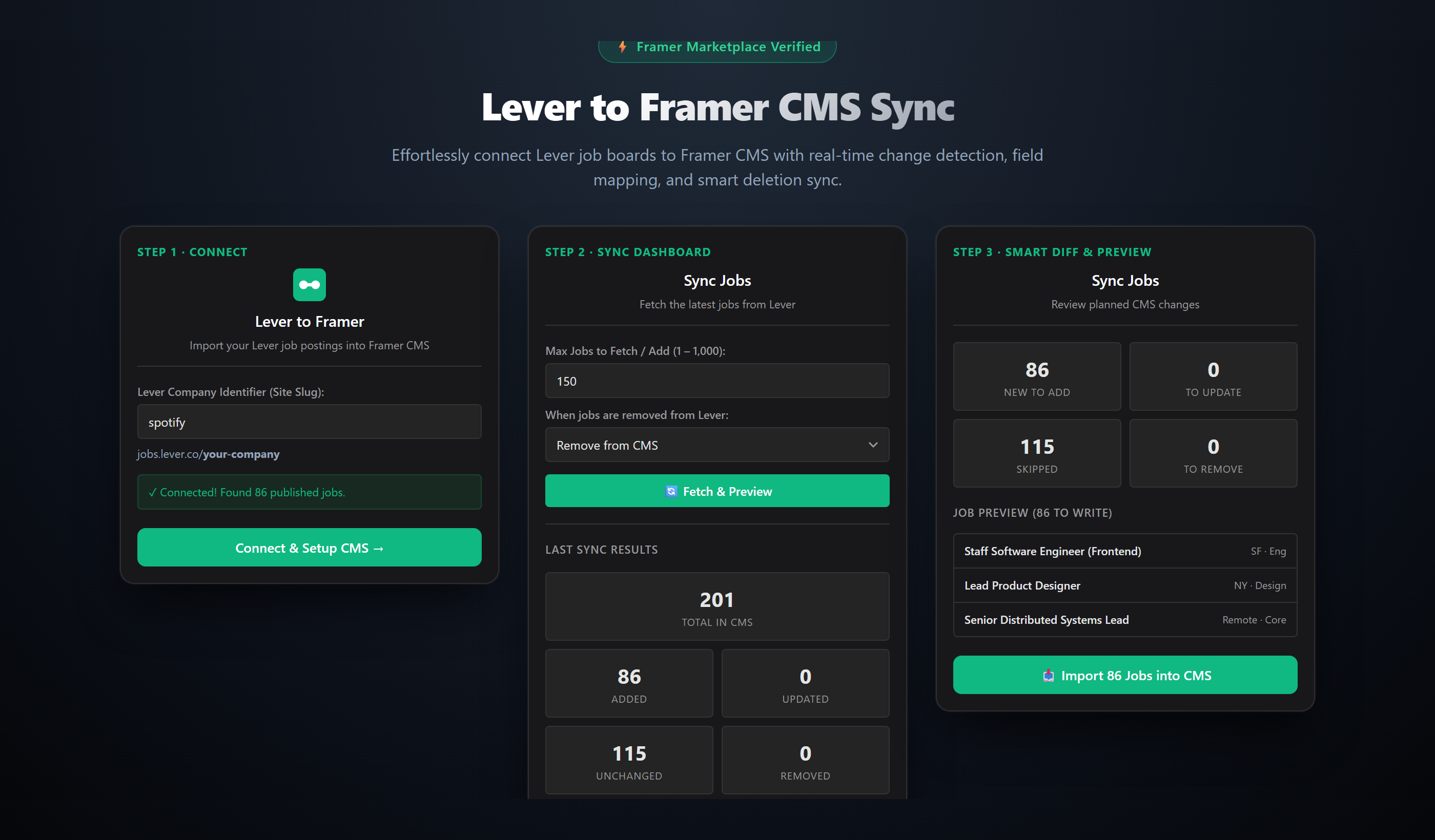
1. 100% Client-Side Privacy (Zero-Relay Architecture)
When you use Lever to Framer Sync, all computation happens locally inside your browser's Framer sandbox. The plugin executes a direct, encrypted HTTPS request from your local machine to Lever's public API (jobs.lever.co).
No third-party intermediary servers. No webhooks. No database storing your hiring content. Zero data leakage.
2. Built-in Smart Reconciler with Automatic Deletions
Say goodbye to "ghost jobs". Our reconciler compares every posting in Lever against existing Framer CMS records and categorizes them in real time:
- Added: New postings that don't yet exist in Framer CMS.
- Updated: Existing postings where titles, locations, descriptions, or requirements have changed.
- Unchanged: Postings that are identical and skipped to save API calls.
- Removed: Roles that were closed or unlisted in Lever. The plugin automatically unlinks and safely deletes them from Framer CMS!
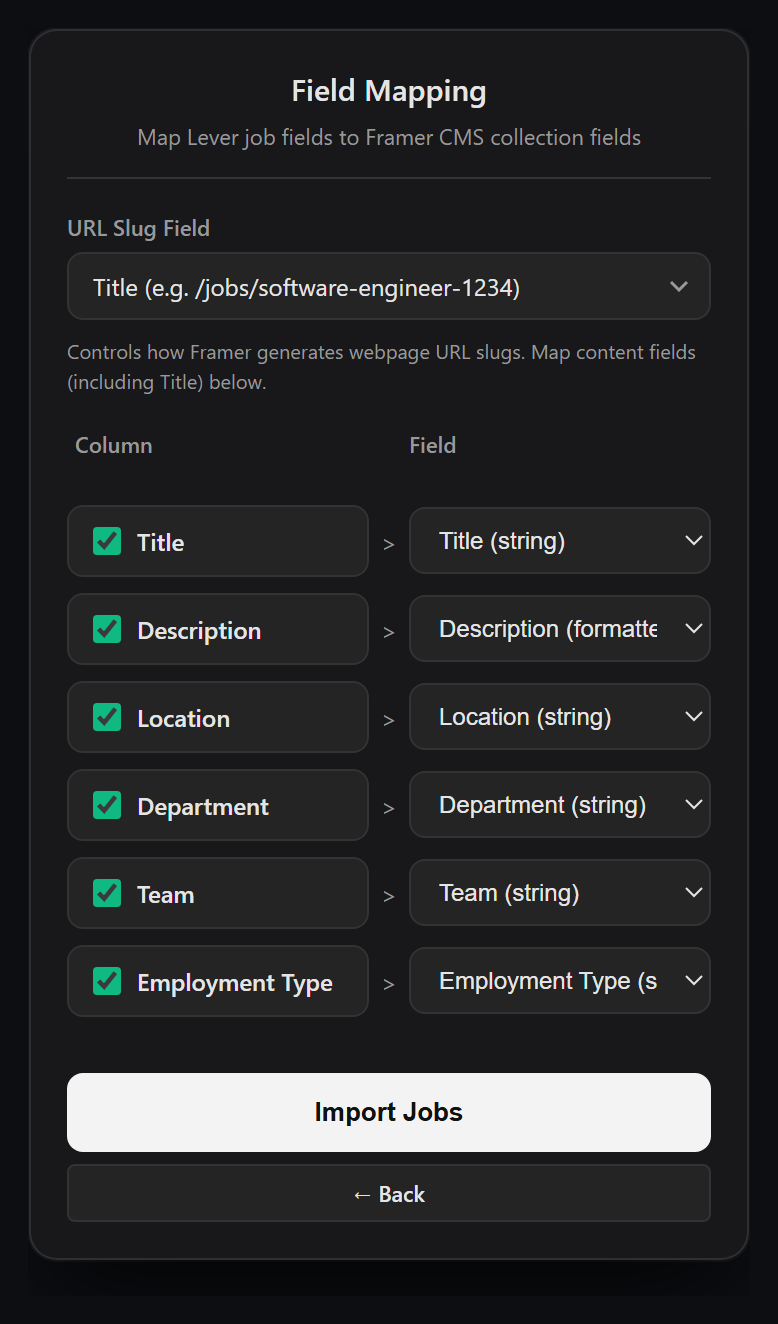
3. Visual 1-Click Field Mapping
Never write a JSON transformer again. In the plugin's intuitive mapping screen, you simply select which Lever field corresponds to which Framer CMS column:
- Job Title → Framer Title field
- Job Slug → Framer Slug field
- Department & Team → Framer Category / Option fields
- Location & Workplace Type (Remote / Hybrid / On-site) → Framer Badge or Text field
- Formatted HTML Job Description & Lists → Framer Formatted Rich Text field
- Apply URL → Framer Link field
4. Instant Diff Preview Before You Commit
Before touching a single live record on your website, the plugin shows you a comprehensive diff inspection modal. You can see exactly which postings will be created, updated, or removed. You are always in full control of your CMS.
5. One-Time $29 Payment vs. Recurring SaaS Overhead
Why pay $20 to $100 every month to an automation tool for basic CMS synchronization? Lever to Framer Sync is available for a single, one-time payment of $29 USD for lifetime access, including all future updates.
Side-by-Side Comparison
| Feature | Raw Fetch | Make / Zapier | Custom Cloud |
Recommended Lever to Framer Sync |
|---|---|---|---|---|
| Native Framer CMS | ❌ No (DOM only) | ✅ Yes | ✅ Yes | ✅ Yes (Native) |
| SEO & Google Jobs | ❌ Poor / None | ✅ Supported | ✅ Supported | ✅ 100% Indexable |
| Auto-Purge Closed Jobs | N/A | ⚠️ Fragile diffs | ⚠️ Custom code | ✅ Auto 1-Click |
| Zero-Relay Privacy | ✅ Direct API | ❌ 3rd-party SaaS | ⚠️ Stored in cloud | ✅ 100% Client-Side |
| Visual Field Mapping | ❌ Manual JS | ⚠️ JSON mapping | ❌ Code only | ✅ Visual dropdowns |
| Setup Time | 2 – 4 hours | 3 – 6 hours | 15 – 30 hours | Under 60s |
| Total Cost | Free (dev labor) | $240 – $1,200/yr | $120 – $400/yr | $29 Lifetime $69 USD |
Conclusion: Stop Wrestling with Webhooks
Your careers page is your company’s front door for world-class talent. You shouldn't have to compromise on Framer’s design elegance, nor should you endure broken automations, stale ghost jobs, or monthly SaaS bills just to display open roles.
By moving to a native in-editor plugin, you get the best of both worlds: complete design freedom on Framer CMS, instant real-time synchronization with Lever, and complete peace of mind.
Sync Your Lever Postings into Framer CMS in Under 60 Seconds
Stop paying monthly automation taxes and fixing broken webhooks. Get direct in-editor synchronization with visual field mapping, automated closed-job purging, and 100% Google Jobs SEO.